116 stars on GitHub Open Source · MIT Not affiliated with Cisco

Describe a network. Watch it build itself.

Two open-source tools for Cisco Packet Tracer. An MCP server that gives any AI client 61 tools over the simulator, and PacketSmith, a terminal agent that draws the topology while it works.

Use either one. Or both — the second runs on the first.

packetsmith
> "Build a 3-router OSPF lab with DHCP and 2 PCs per LAN"

  pt_full_build           4.1s
  pt_verify_connectivity  2.8s

  Two-level star: the 3560 does the core with SVIs per VLAN.
  Verified against the devices, not the plan:

    VLANs 10/20/30 on SW-CORE     all three present
    Ping PC-VEN1 -> SRV-WEB       OK (4/4)

in the real app, the right-hand panel draws this as it happens

MCP-Packet-Tracer

61
MCP tools
75
Device models
127
Modules
9
Templates

PacketSmith

~150
Providers
3
Wire protocols
13
Themes
367
Tests

The engine and the cockpit.

Separate projects, and either works on its own. Together, one drives the other.

Layer 1 · The engine

MCP-Packet-Tracer

Gives the AI hands.

An MCP server exposing 61 tools over Packet Tracer: place devices, run cables, assign IPs, deploy and verify. Connect it to any MCP client — Claude Code, Cursor, VS Code — and that client can build networks.

  • 61 MCP tools
  • 75 real device models
  • 9 topology templates
  • Python · MIT
Layer 2 · The cockpit

PacketSmith

And lets you watch it happen.

A terminal agent built for network labs. Conversation on the left; on the right, the topology drawing itself from every tool the agent runs. It brings its own agent loop, so it talks to 150 model providers as well as the Claude CLI.

  • Live topology panel
  • 150 model providers
  • 3 wire protocols
  • TypeScript · MIT
  you --> any MCP client                    you --> PacketSmith
          Claude Code, Cursor, VS Code               terminal, split screen
                    |                                         |
                    v                                         v
            MCP-Packet-Tracer   <---- same server ----   MCP-Packet-Tracer
                    |                                         |
                    v                                         v
            Cisco Packet Tracer                       Cisco Packet Tracer
                                                      + live topology panel

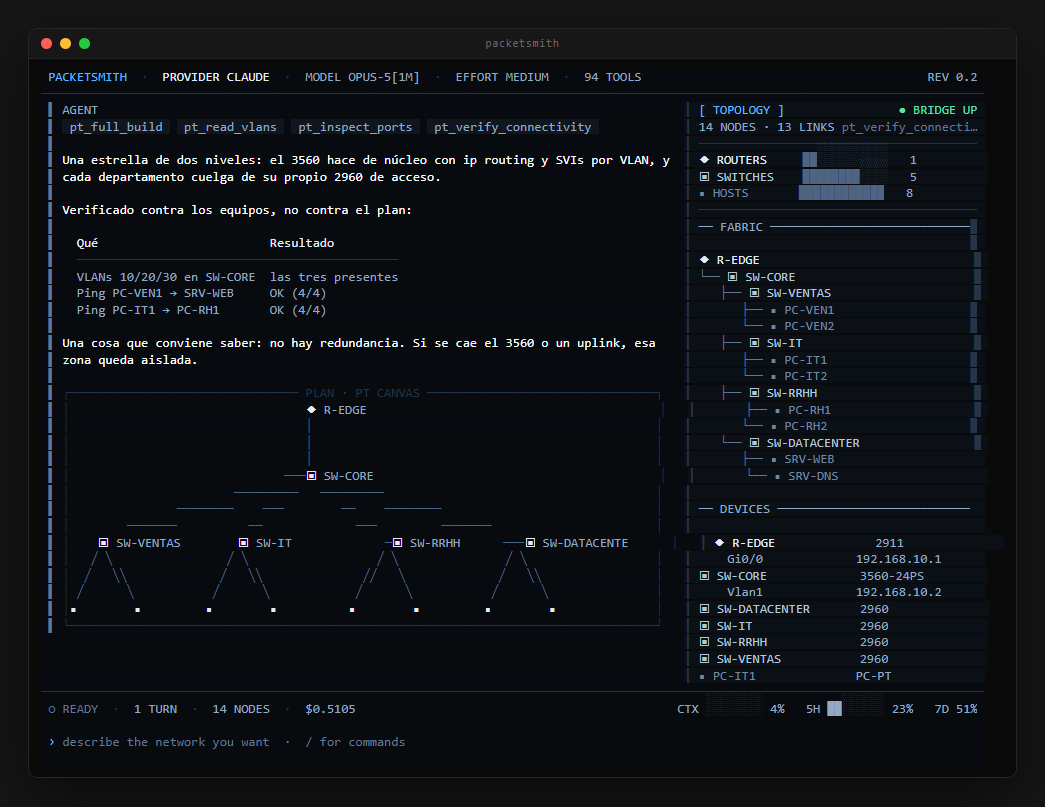
What a terminal adds that a chat window cannot.

Any MCP client can drive the server perfectly well. What none of them can do is show you the network while it is being built.

PacketSmith: one turn end to end — tool badges, a verification table, the canvas plan and the topology panel

Derived, not claimed

The panel is parsed from the raw result of every tool call. A device the agent says it created but did not, simply does not appear.

Two views, two questions

A fabric tree answers what hangs off what. A canvas plan, drawn from Packet Tracer own coordinates, answers how it is laid out.

Where the time went

Context, plan quota, and a turn split between time in Packet Tracer and time in the model. That last one is usually the answer to "why is this slow".

Three steps, either way.

The flow is the same whether you drive the server from your editor or from PacketSmith.

01

Describe what you need

Plain language, in any language. No commands, no device model names, no port syntax.

02

It plans and validates

Devices, cables, IPs, DHCP, routing — planned, checked against what Packet Tracer actually supports, and refused early if it would not work.

03

It deploys, and verifies

The topology appears in Packet Tracer as it is built, and connectivity is checked against the devices — not against the plan. In PacketSmith you watch the panel fill in; from another client, you read the tool results.

Just tell the AI what you need.

Real prompts, and they work the same from Claude Code, from Cursor or from PacketSmith — it is the same server underneath.

"Build me a 2-router OSPF lab with DHCP"

→ 2 routers, 2 switches, 4 PCs, DHCP pools, OSPF area 0

"I need a simple LAN with 1 router and 3 PCs"

→ 1 router, 1 switch, 3 PCs, static IP addresses

"Create a branch office topology with 4 routers and WAN"

→ 4 routers, 4 switches, 8 PCs, WAN cloud, EIGRP routing

"3-router triangle with redundant links and OSPF"

→ 3 routers in mesh, 3 switches, 6 PCs, full redundancy

What the server already knows.

Every model verified against Packet Tracer 8.2+ with its real port names. You never type a device name or pick a cable — the server does, and it refuses what would not work.

Routers

29112901194118412811ISR4321ISR43312620XM2621XM829CGR1240819HGW

Switches L2

2960-24TT2950-242950T-24IE-2000

Switches L3

3560-24PS3650-24PS

End Devices

PCLaptopServerTabletSmartphonePrinterTVVoIP Phone

Security

ASA 5505ASA 5506-X

Wireless

AccessPoint-PTWLC-PTWLC-2504LAP-PT3702iLinksys WRT300N

WAN & Cloud

Cloud-PTDSL ModemCable Modem

Other

HubBridgeRepeaterSnifferMCUSBC

Cables, auto-selected

10 types. You do not choose.

straight Router ↔ Switch, Switch ↔ PC
cross Router ↔ Router, Switch ↔ Switch
serial WAN serial connections
fiber High-speed uplinks
console Management access
wireless WiFi connections

Expansion modules

127 in the catalog, installed on demand.

HWIC-2T 2-port Serial WAN card
HWIC-4ESW 4-port Ethernet Switch
NIM-2T 2-port Serial for ISR 4000
HWIC-1GE-SFP 1-port GigE SFP
NM-4A/S 4-port Async/Sync Serial
NM-ESW-161 16-port Ethernet Switch module

Routing & addressing

IPs, DHCP pools and configs, generated.

OSPF Open Shortest Path First
EIGRP Enhanced Interior Gateway
Static Static routes generated for each router based on topology
RIP Routing Information Protocol

9 topology templates — or build from scratch

Single LANMulti LANMulti LAN + WANStar (Hub & Spoke)Hub and SpokeBranch OfficeThree Router TriangleRouter on a StickCustom

Pick your entry point.

Already living in Claude Code or Cursor? Install the server. Want the topology in front of you instead of buried in a scrollback? Install PacketSmith.

PacketSmith

one command

A compiled binary with its runtime inside. No Bun, no Node, no npm needed on the machine.

npm

npm i -g packetsmith

bun

bun add -g packetsmith

macOS · Linux · WSL

curl -fsSL https://raw.githubusercontent.com/Mats2208/packetsmith/main/scripts/install.sh | sh

Windows

irm https://raw.githubusercontent.com/Mats2208/packetsmith/main/scripts/install.ps1 | iex

Then packetsmith setup once, to install the MCP server and the Packet Tracer extension.

Full install guide

MCP-Packet-Tracer

python 3.11+

For any MCP client you already use. It is not on PyPI yet, so it installs from the repo.

From the repo

git clone https://github.com/Mats2208/MCP-Packet-Tracer
cd MCP-Packet-Tracer
pip install -e .

Register it with your client

claude mcp add --scope user --transport stdio packet-tracer \
  -- python -m packet_tracer_mcp --stdio

Works with Claude Code, Cursor, VS Code / Copilot, or anything else that speaks MCP.

Full install guide

One thing neither can automate: Packet Tracer only accepts its extension through its own menu — Extensions ▸ Scripting ▸ Configure PT Script Modules. Both installers print the exact path to select.

Two projects. Both free, both yours.

MIT, open source, and built in the open. A star helps people find them — and if you want to contribute, issues and PRs are welcome on either repo.