How It Works
From a sentence to
a running topology.
Five concrete steps take you from a plain description to a fully deployed network topology inside Cisco Packet Tracer.
The user describes a lab
Intent
A user or AI agent describes a network topology in natural language. The request is translated into structured parameters: number of routers, PCs per LAN, DHCP, WAN links, routing protocol, and device models.
                    "Build a 3-router OSPF lab with DHCP
and 2 PCs per LAN, plus a WAN link."
The orchestrator builds the topology
Planning
The domain layer creates a complete topology plan: devices with models, links with cable types, coordinates for positioning, IP addressing scheme, DHCP pool configurations, and routing protocol blocks.
                    pt_plan_topology(
  routers=3,
  pcs_per_lan=2,
  dhcp=True,
  routing="ospf",
  has_wan=True,
  router_model="2911"
)
The plan is checked against real PT constraints
Validation
Validators catch 15+ error types: invalid models, duplicated names, bad ports, reused interfaces, cable mismatches, DHCP issues, and IP conflicts. The auto-fixer can correct cables, upgrade router models, and reassign ports automatically.
                    pt_validate_plan(plan)
# ✓ All device models valid
# ✓ No duplicate names
# ✓ No port conflicts
# ✓ Cable types correct
# ✓ IP addressing valid
# ✓ DHCP pools consistent
Build artifacts are created
Generation
The server generates multiple outputs: a PTBuilder-style JavaScript build script for topology construction, IOS CLI configuration commands per device, host configuration instructions, project files for persistence, and natural language explanations.
                    pt_generate_script(plan)  → topology.js
pt_generate_configs(plan) → R1_config.txt
                           → R2_config.txt
                           → SW1_config.txt
pt_explain_plan(plan)     → explanation.md
Packet Tracer receives the result
Delivery
Choose your delivery method: export files for manual use, copy to clipboard for paste, or deploy live through the HTTP bridge. The bridge streams commands to the MCP Control Center extension running inside Packet Tracer, which executes them in real-time.
                    # Option A: Export artifacts
pt_export(plan, path="./my_lab/")

# Option B: Live deploy
pt_live_deploy(plan)
# → Devices appear in PT in real-time
# → Links created automatically
# → Configs applied via CLI
Live Deploy Architecture
The HTTP bridge connects
Python to Packet Tracer.
The most innovative part of the project: a bidirectional bridge that sends JavaScript commands from the MCP server into PT's Script Engine in real-time.
MCP Server
Python server on port 39000. Receives MCP tool calls, runs the pipeline, sends JS to the bridge.
Command Bridge
ThreadingHTTPServer on port 54321. Queues JS commands and relays results between Python and PT.
MCP Control Center
This project's own PT extension (a .pts Script Module). Its built-in webview polls GET /next every 500ms and runs received code — no bootstrap to paste.
PT Script Engine
Executes ipc.* calls to create devices, links, and send CLI configs. No HTTP access — routes through webview.
MCP Control Center extension
No bootstrap to paste. Install this project's own
.pts extension once
(Releases →
Extensions → Scripting → Configure PT Script Modules → Add…),
then open Extensions → MCP BUILDER. The MCP Control Center has the
polling loop built in — it auto-connects to the bridge and runs commands via the Script Engine.
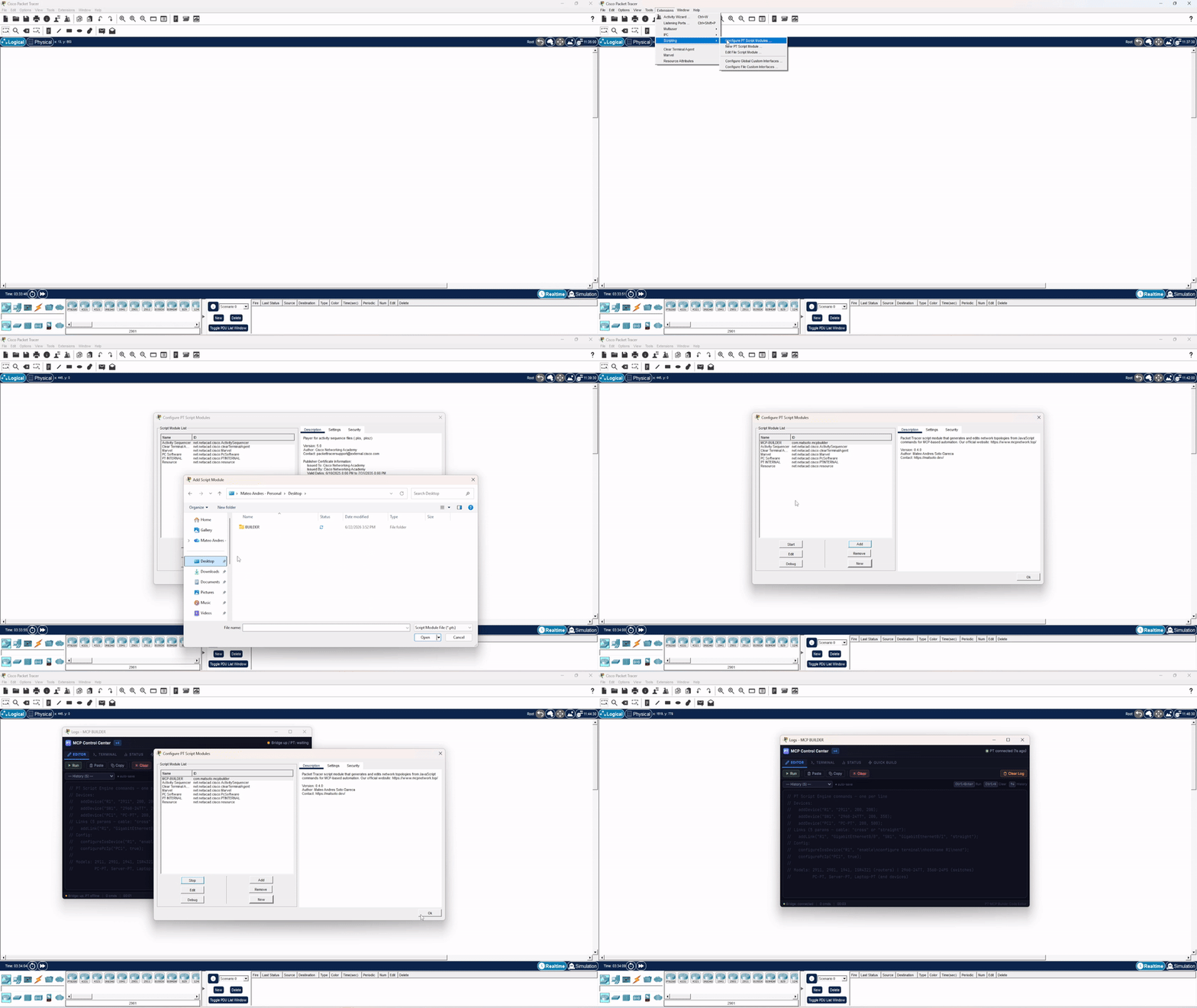
Step-by-step in the Live Deploy docs ↗.
Bridge Endpoints
HTTP API on port 54321.
/next GET Webview polls this. Returns queued JS command or empty. /ping GET Health check. Returns "pong". /status GET Connection status JSON. /result GET Long-poll for result from PT (9s timeout). /result POST PT posts execution results here (via webview). /queue POST Python enqueues JS commands here. Who drives it
The pipeline needs a client on top.
Everything above is the server. Something has to talk to it — and what you pick changes what you get to see while it works.
Claude Code, Cursor, VS Code
Register the server once and it becomes another set of tools in the client you already use. The topology lives in Packet Tracer; the conversation lives in your editor.
How to register it →A terminal built for this
Same server, same pipeline, same 61 tools. The difference is a panel that derives the topology from every tool result — a fabric tree and a canvas plan, updating while the deploy runs instead of after it.
What PacketSmith is →Ready to try it?
Follow the quick start guide or jump straight into the code.